Title here
Summary here

In this page you will find a set of steps to troubleshoot and hopefully fix your Oakestra setup.
On each machine where you installed oakestra you can run:
oak doctor <component>where root for Root Orchestrator, cluster for Cluster Orchestrator, workerfor the Worker Node or all if all the components are installed in the current machine.
E.g.: oak doctor root
With such command, you can either check the status of the root, cluster or worker node components.
You can use Claude AI to pinpoint your problem and help you fix your innfrastructure configuration
First you need to install Claude CLI. Then you can run
oak config claudeThis command installs the Oakestra Teoubleshooting Skill in your Claude CLI.
Then you can use:
oak doctor <component> --ai-troubleshoot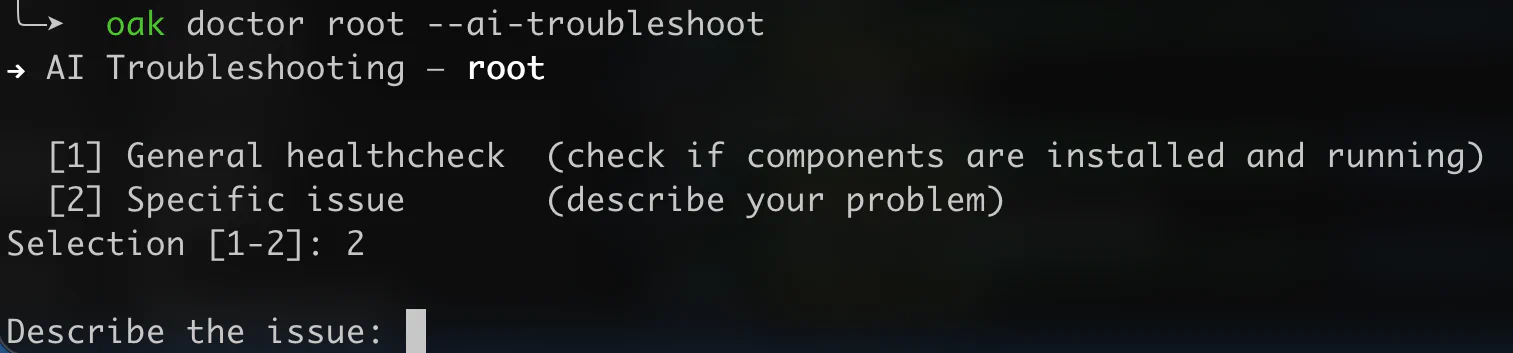
You can either perform a general check or describe a specific issue.
Oak doctor with the -ai-troubleshoot flag uses Claude CLI. It requires either an active subscription or a payment method configured for your token consumptions. Check the pricing here.
If you want to use your own AI agent to help you troubleshoot your Oakestra deployment, you can request assistence to you agent by manually installing the troubleshoot oakestra skill.
Here a quick reference of the commands you can run to manually troubleshoot your Oakestra installation.
docker ps --format "table {{.Names}}\t{{.Status}}\t{{.Ports}}"system_manager, mongo, root_scheduler → Root Orchestratorcluster_manager, mqtt, cluster_scheduler → Cluster OrchestratorNodeEngine binary/service → Worker Nodedocker ps -a --format "table {{.Names}}\t{{.Status}}"Root expects: system_manager, mongo, mongo_net, root_service_manager, root_redis, root_scheduler, root_resource_abstractor, jwt_generator, grafana, loki, promtail, oakestra-frontend-container
Cluster expects: mqtt, cluster_mongo, cluster_mongo_net, cluster_service_manager, cluster_manager, cluster_scheduler, cluster_resource_abstractor, cluster_redis, prometheus, cluster_grafana, cluster_loki, cluster_promtail
If a container is Exited or Restarting, read its logs immediately:
docker logs --tail 100 <container_name> 2>&1| Symptom | Likely cause | Fix |
|---|---|---|
| Container keeps restarting | Dependency (DB/Redis) not ready | docker restart <container> after deps are healthy |
Connection refused to mongo/redis | Wrong URL env var or DB not ready | Check env vars; restart affected container |
no such host | Host-network mode: DNS names don’t work | Use IPs, not container names in env vars |
JWT errors in system_manager | jwt_generator not started | docker restart jwt_generator |
| Cluster not registering with root | Wrong SYSTEM_MANAGER_URL (using localhost) | Use the root machine’s real IP, not localhost |
Jobs stuck in CLUSTER_SCHEDULED | Worker not acknowledged or MQTT down | Check worker logs and MQTT health |
| Worker can’t connect to MQTT | Firewall blocking port 10003 | sudo ufw allow 10003/tcp on cluster machine |
| Port already in use | Another process on the port | sudo ss -tlnp sport = :<port>, then kill the PID |
# Is cluster_manager pointing at the real root IP?
docker exec cluster_manager env | grep SYSTEM_MANAGER_URL

# Are Redis addresses correct?
docker exec root_scheduler env | grep REDIS_ADDR        # should end in @root_redis:6379
docker exec cluster_scheduler env | grep REDIS_ADDR     # should end in @cluster_redis:6479
SYSTEM_MANAGER_URL must be the root machine’s real IP — not localhost or 127.0.0.1 unless everything is on one machine.
docker exec root_redis    redis-cli -a rootRedis    ping
docker exec cluster_redis redis-cli -p 6479 -a clusterRedis ping
Check for stuck jobs:
docker exec root_redis    redis-cli -a rootRedis    llen "asynq:{schedule:job}:failed"
docker exec cluster_redis redis-cli -p 6479 -a clusterRedis llen "asynq:{schedule:job}:failed"
A non-zero failed count means the scheduler is rejecting jobs — check scheduler logs.
docker inspect mqtt --format '{{.State.Health.Status}}'
docker logs mqtt 2>&1 | tail -30
An unhealthy MQTT blocks all worker communication.
curl -s http://<ROOT_IP>:10000/api/v1/infoIf this fails from the cluster machine, the firewall is blocking port 10000.
curl -s http://localhost:10000/api/v1/info        # root system_manager
curl -s http://localhost:10004/status             # root_scheduler
curl -s http://localhost:11011/status             # root_resource_abstractor
curl -s http://localhost:10105/status             # cluster_scheduler
curl -s http://localhost:11012/status             # cluster_resource_abstractor
curl -s http://localhost:10011/status # jwt_generator# Logs
tail -100 /var/log/oakestra/nodeengine.log
tail -100 /var/log/oakestra/netmanager.log
# Service status
systemctl status NodeEngine
systemctl status NetManager
# Can worker reach cluster?
nc -zv <CLUSTER_IP> 10003 # MQTT
nc -zv <CLUSTER_IP> 10100 # cluster_manager
nc -zv <CLUSTER_IP> 10110 # cluster_service_manager# Stop and remove all Oakestra containers
docker ps -a --format "{{.Names}}" \
| grep -E "system_manager|mongo|root_|cluster_|jwt_|grafana|loki|promtail|mqtt|addons|marketplace|oakestra" \
| xargs -r docker rm -f
# Then re-run the startup script with the correct IP
export SYSTEM_MANAGER_URL=<real_ip>
oak install root # or cluster or full| Port | Used by | Direction |
|---|---|---|
| 10000 | Root API | Cluster → Root |
| 10099 | Root service manager | Cluster → Root |
| 10003 | MQTT | Worker → Cluster |
| 10100 | Cluster manager | Worker → Cluster |
| 10110 | Cluster service manager | Worker → Cluster |
| 80 | Dashboard | Browser → Root |
Open an issue or ask in our discord channel and include:
docker ps -adocker logs <name> 2>&1)docker --version, docker compose version)