Title here
Summary here

The addons system consists of three subsystems:
The cluster and root orchestrator each deploy an instance of the:
While sharing an instance of the addons marketplace, which is deployed at the root.
Learn more about addons
The addons manager and marketplace both expose API endpoints by which they can be controlled. For a user-firendly experience the addons dashboard is recommended.
The Addons Dashboard
Since the release of Conga the addons system provides an intuitive UI in the form of the Dashboard
After starting the orchestrator the dashboard is reachable at (replace localhost with address of hosting machine):
Root: localhost:11103
Cluster: localhost:11203
Do you prefer to use the API?
You can find a detailed outline of all the API endpoints at:
<marketplace-ip>:11102/api/docsThe dashboard intefaces with the addons marketplace, addons engine and the resource abstractor. To configure where the dashboard reaches these components use the configuration menu.
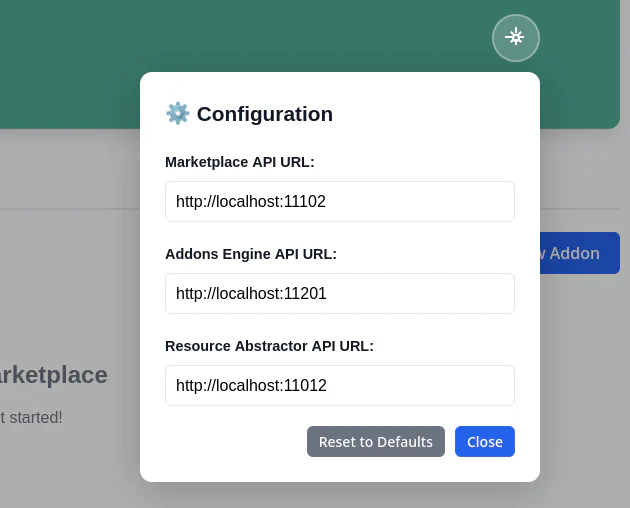
| Root | Cluster | |
|---|---|---|
| Marktetplace | 11102 | - |
| Addons Engine | 11101 | 11201 |
| Resource Abstractor | 11011 | 11012 |
To disable the addons system when deploying Oakestra components, you need to export the following override file before using the startup command:
export OVERRIDE_FILES=override-no-addons.yamlTo start a single machine root and cluster orchestrator with the addons engine and the marketplace disabled, you can use:
 export OVERRIDE_FILES=override-no-addons.yaml
 curl -sfL oakestra.io/getstarted.sh | sh -
Did you know?
The environment variable OVERRIDE_FILES is used at Oakestra startup to customize the services composing the control plane. These files are simple docker compose files integrated into Oakestra via the override functionality.